
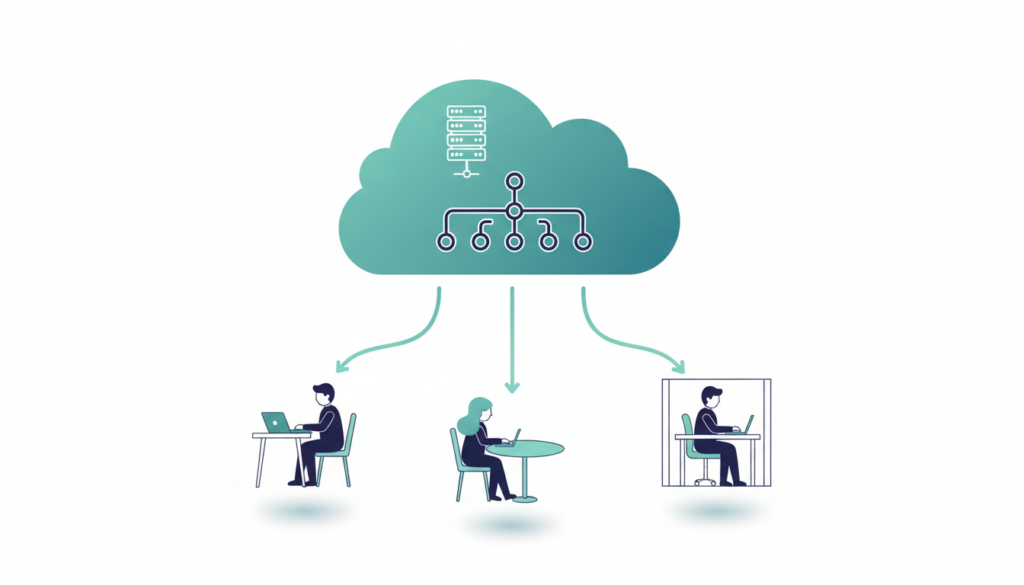
A cloud phone system is a business phone system that lives on the internet instead of in a box in your office. No PBX in a closet. No technician rewiring desks. Your numbers, extensions, menus, voicemail and call routing all run in the provider’s data centers, and your team answers on apps or desk phones from anywhere.
That’s exactly how I run my business today. I live in Bali, and my US business number runs on Quo, a cloud phone system. Calls ring my laptop and phone. If I can’t answer, Quo’s AI agent Sona picks up. If someone needs me directly, I ask them to WhatsApp me. My entire “phone system” is an app and a login.
Back when I was running high-ticket stores (I’ve been doing it since October 2010), the phone was a big share of revenue. Buyers spending thousands of dollars want to talk to a real person before they order. A cloud phone system is what lets a small team answer those calls fast, from anywhere, without buying any hardware.
In this guide I’ll explain how cloud phone systems work, the features that matter, what they cost in 2026, the real downsides, and how to choose one. Pricing comes from official provider pages I checked on November 3, 2026. Quo is the only one I use personally. Everything else is research-based, per our editorial standards.
What is a cloud phone system?
A cloud phone system is a hosted business phone service where the “brain” of the phone system, the PBX, runs on the provider’s servers. You access it through the internet. You manage everything in a web dashboard, and your team makes and takes calls on mobile apps, desktop apps, web browsers or IP desk phones.
You’ll hear a few names for the same idea:
- Cloud phone system or cloud PBX.
- Hosted PBX.
- Business VoIP or a virtual phone system.
- UCaaS (unified communications as a service), when video meetings and chat are bundled in.
They overlap a lot. The core idea is that you rent the phone system as a service instead of owning the equipment. That fits the NIST definition of cloud computing, which describes on-demand, self-service access to shared resources over a network. In plain English: you log in, click a few buttons, and the system is yours.
How a cloud phone system works
The technology underneath is VoIP. If you want the full breakdown, read my guide on what VoIP is. Here’s the short version for a cloud system:
- Your business numbers are hosted by the provider.
- When someone calls, the call reaches the provider’s cloud PBX.
- The cloud PBX follows your rules: business hours, greeting, menu, ring group, queue, voicemail or AI answering.
- The call is sent over the internet to whichever devices are logged in, using SIP, the standard defined in IETF RFC 3261.
- Your team answers on an app or desk phone. Recordings, transcripts and call logs are saved in the cloud.
Because the brain is in the cloud, it doesn’t matter where your team sits. A teammate in Texas, another in the Philippines and me in Bali could all answer the same business number.
Cloud phone system vs on-premise PBX
Here’s how the two compare for a small or mid-sized business.
| Factor | Cloud phone system | On-premise PBX |
|---|---|---|
| Where the system lives | Provider’s data centers | Hardware in your office |
| Upfront cost | Low, mostly monthly fees | High, hardware plus installation |
| Maintenance | Provider handles updates and servers | You or your IT vendor handle it |
| Remote and mobile work | Built in with apps | Often needs extra setup |
| Adding users | Minutes in a dashboard | May need new hardware or licenses |
| Internet outage | Calls can fail over to mobile apps or forwarding | Internal calls may still work, outside lines depend on the carrier connection |
| Control and customization | Limited to what the provider offers | Full control if you have the expertise |
For most small businesses in 2026, cloud wins easily. On-premise still makes sense for some large organizations with special compliance needs, existing hardware investments or in-house telecom teams. If you already own a PBX and want to keep it, look at SIP trunking instead.
Features that actually matter
Every cloud phone system has a long feature list. Here are the ones that make a real difference for small businesses.
Auto attendant and phone menus
A greeting that says “Press 1 for sales, 2 for support.” Keep it short. Two or three options max. Every extra menu option costs you callers.
Ring groups and call routing
Ring several people at once, in order, or round-robin. On a high-ticket store, ringing 2 or 3 people at once means the call gets answered fast. That’s where the money is.
Business hours and after-hours rules
Different routing for open hours, after hours and holidays. This is where AI answering or voicemail kicks in.
Shared inbox for calls and texts
Seeing every call, voicemail and text with a customer in one thread is a huge time saver. It’s one of my favorite parts of Quo.
Call recording and transcripts
Great for training and dispute resolution. Make sure you follow consent laws. Federal law in 18 U.S.C. 2511 generally allows one-party consent, but several states require everyone on the call to consent, so a quick “this call may be recorded” greeting is the safe move.
AI answering and summaries
This is the biggest change in cloud phone systems over the past couple of years. Quo includes its Sona AI agent on every plan, with 1,000 free credits (about 10 calls) before paid tiers. RingCentral’s AI Receptionist is an add-on starting at $39, according to its pricing page. Aircall sells AI Voice Agents from a $100 monthly minimum. I break this down in my AI receptionist guide.
Queues and analytics
Call queues with hold music, wait time stats and missed-call reports. Essential for support teams. Overkill for a solo founder.
Integrations
CRM integrations (HubSpot, Salesforce and others) log calls automatically. These usually sit on mid-tier plans. Quo includes HubSpot and Salesforce integrations on its Business plan.
What cloud phone systems cost in 2026
Most cloud phone systems charge per user per month, with a discount for annual billing. Here’s what official pricing pages showed on November 3, 2026. Prices change, so confirm on each provider’s page.
| Provider | Entry plan | Mid-tier plan | Notes |
|---|---|---|---|
| Quo | $15 per user per month annually ($19 monthly) | $23 annually ($33 monthly) | 7-day free trial, Sona AI agent included |
| Nextiva | $15 annually ($23 monthly) | $25 annually ($50 monthly) | AI assistant billed at $1.50 per conversation |
| Dialpad | $15 annually | $25 annually | 14-day free trial, AI recaps included |
| RingCentral | $20 annually ($30 monthly) | $25 annually ($35 monthly) | Prices shown for 1 to 5 users |
| Aircall | $30 per license annually | $50 per license annually | 3-license minimum |
| Talkroute | $19 per month with 1 user | $39 per month with 3 users | $5 per additional user |
Budget for these extras too:
- Extra numbers, typically around $5 a month each.
- Texting registration fees. On Quo, The Campaign Registry charges $19.50 one time plus $1.50 to $3 a month.
- International calling, usually per minute.
- AI usage beyond included credits.
- Desk phones and headsets if you want hardware. My VoIP phones guide covers what’s worth buying.
The benefits of a cloud phone system
Work from anywhere
This is the big one. Your business number goes where you go. I’ve built my whole lifestyle around being location independent, and a cloud phone system is a big part of that.
Low upfront cost
No PBX hardware, no installation fees for the system itself. Most teams can start for $15 to $35 per user per month.
Fast setup and easy changes
Add a user, change business hours or record a new greeting in minutes. No calling a technician.
Scales up and down
Hiring for a busy season? Add seats. Slow month? Remove them on monthly plans.
Built-in reliability features
Providers run redundant data centers, and most let you forward calls to mobile numbers if your office internet goes down. Dialpad’s pricing page, for example, lists a 99.9% uptime commitment on its Enterprise plan.
The downsides (be honest with yourself here)
You depend on internet
If your office internet goes down, desk phones stop working. Set up failover to mobile apps or call forwarding on day 1.
Call quality depends on your network
Bad Wi-Fi equals bad calls. Wire desk phones with Ethernet, use decent headsets and don’t let a giant upload choke your connection mid-call.
Less control than owning the hardware
You get the features the provider builds. If you need very custom call flows or specific compliance setups, check before you commit.
911 works differently
The FCC requires interconnected VoIP providers to support 911 and get a registered address, and warns that VoIP 911 may fail during power or internet outages. The details are in its VoIP and 911 guide. Multi-line systems must also let people dial 911 directly without a prefix, under Kari’s Law. And remote workers need their registered address kept current.
Some app-based services don’t support 911 at all. Quo’s porting documentation says emergency services (911) aren’t available through Quo. That’s fine for how I work, but an office should confirm 911 support and the registered address for every location and phone with the provider before switching. The National 911 Program’s calling 911 FAQ is also worth a read.
Costs creep up
Per-user pricing is cheap at 2 users and less cheap at 40. Add-ons like AI, toll-free minutes and extra numbers add up. Review your bill every quarter.
Who should use a cloud phone system?
Cloud phone systems are a great fit for:
- Solo founders and small teams who want a professional business number without hardware.
- Ecommerce stores, especially high-ticket ones, where phone sales matter.
- Remote and hybrid teams spread across cities or countries.
- Agencies and service businesses that need call recording and CRM logging.
- Growing companies that want to add users quickly.
Think harder if you:
- Have very unreliable internet with no good mobile data backup.
- Need a phone that works through long power outages without battery backup.
- Have strict regulatory requirements your provider can’t document.
How to choose a cloud phone system
Here’s the checklist I’d use.
- Count users and numbers. Who needs a seat? How many numbers, local or toll-free?
- Map your call flow. Business hours, ring groups, after-hours rules, voicemail or AI. My business VoIP for beginners guide walks through this.
- List must-have features. Call transfers, phone menus, call recording, CRM integration, queues, texting volume.
- Check what’s on each tier. Many key features sit on the mid-tier plan, not the entry plan.
- Confirm 911, texting registration and porting with the provider.
- Run a real trial. Use the free trial with real calls, from the real rooms your team works in.
- Price your actual month, including add-ons, on 2 or 3 finalists.
Setting up a cloud phone system: step by step
- Sign up and pick a temporary number to test with.
- Add users and send invites.
- Build your call flow: greeting, hours, ring group, voicemail or AI fallback.
- Submit texting registration right away. Quo says most approvals happen in 24 to 48 hours, but some take up to 20 days.
- Install apps on laptops and phones. Add desk phones only where needed.
- Port your existing number. Keep the old service active until the port completes, which Quo says usually takes 3 to 7 business days.
- Test everything from an outside phone: inbound, outbound caller ID, after hours, voicemail, texting.
- Update your website, Google Business Profile and email signatures.
Common mistakes to avoid
These are the mistakes that cause the most trouble when a business moves to the cloud. Here’s how to dodge them.
- Building a giant phone menu. Callers hate pressing 4 buttons to reach a human. Keep it to 2 or 3 options, or skip the menu entirely if you only have one team.
- Canceling the old carrier too early. Wait until the port is fully complete and you’ve tested inbound calls. Canceling first can lose the number for good.
- Forgetting texting registration. Your texts can get filtered until it’s approved, so submit it on day 1.
- No after-hours plan. Decide whether calls go to voicemail, an AI agent or a live answering service. Don’t let them ring into nothing.
- Never reviewing missed calls. Check your missed-call report every week. On a high-ticket store, one missed call can be a lost $5,000 order.
My picks for 2026
Here’s how I’d decide, based on my own use of Quo and research on the others.
For solo founders and small online teams, I’d pick Quo. It’s what my business runs on from Bali. You get a shared inbox for calls and texts, unlimited US and Canada calling, and the Sona AI agent on every plan. Most teams will want the Business plan for phone menus and call transfers.
For teams that want AI transcripts and summaries on everything, Dialpad puts AI recaps in its Standard plan and offers a 14-day free trial, according to its pricing page.
For support teams that want phone, chat and ticketing together, Nextiva bundles those channels into its NEXT plans.
For sales teams of 3 or more working inside a CRM, Aircall is built for that, with a 3-license minimum.
For budget-minded teams that like flat bundles, Talkroute’s Plus plan covers 3 users for $39 a month.
And if you want to compare a few more options, CallHippo offers a 10-day free trial, so you can test its cloud phone system before you pay. I haven’t used it myself.
For a deeper list, see my picks for the best VoIP for small business.
Why this matters for online sellers
At Ecommerce Paradise, I teach high-ticket dropshipping. One lesson I repeat constantly: put a real phone number on every page and answer it. In 2022 I sold a multi-store portfolio doing about $7M a year, and phone sales were a real part of that. A cloud phone system is what lets you run that playbook with a tiny team, from anywhere in the world.
FAQ
What is a cloud phone system?
A cloud phone system is a business phone system hosted by a provider over the internet. Your numbers, call routing, voicemail and recordings live in the cloud, and your team uses apps or IP desk phones to make and take calls.
Is a cloud phone system the same as VoIP?
Not exactly. VoIP is the technology that sends calls over the internet. A cloud phone system is a full business phone system, with menus, extensions, ring groups and admin tools, built on top of VoIP and hosted by a provider.
How much does a cloud phone system cost?
As of November 2026, entry plans from Quo, Nextiva and Dialpad start at $15 per user per month on annual billing, and RingCentral starts at $20. Expect extra costs for numbers, texting registration, international calls and AI usage.
Do I need special phones for a cloud phone system?
No. Most cloud phone systems work on mobile and desktop apps. You can add IP desk phones or cordless DECT phones if your team prefers hardware, but check your provider’s supported devices first.
Are cloud phone systems secure?
Reputable providers secure their data centers and offer admin controls, but you’re responsible for strong passwords, two-factor login and limiting admin access. Ask providers for their security and compliance documentation if you handle sensitive data.
What happens to a cloud phone system if the internet goes down?
Desk phones and desktop apps stop working until the connection returns. Most providers let you forward calls to mobile numbers or answer in their mobile app over cellular data, so set that up as your backup.
Related guides
- Hosted PBX explained
- What is VoIP?
- VoIP phone service buyer’s guide
- Best virtual phone systems for small business
- SIP trunking guide

Trevor Fenner publishes VoIP Paradise, covering business phone software, remote-team communications and practical calling workflows. Articles distinguish documented research from direct testing.