
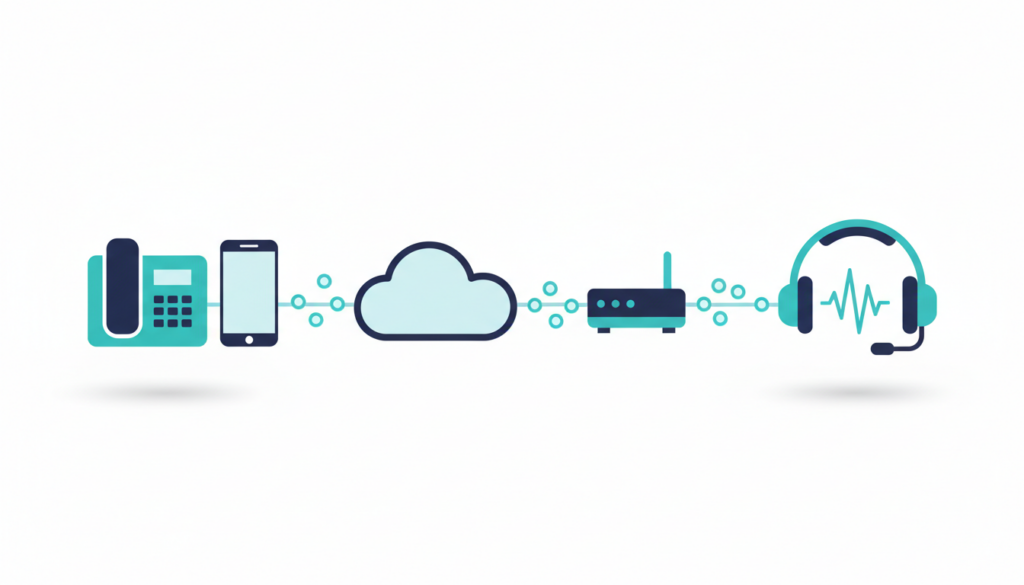
VoIP stands for Voice over Internet Protocol. In plain English, it means your phone calls travel over the internet instead of old copper phone lines. Your voice gets chopped into small packets of data, sent across the network, and put back together on the other end in a fraction of a second.
That is the whole idea. Everything else, the apps, the desk phones, the call menus, the AI receptionists, is built on top of that one simple change.
I have been selling online since 2005 and running high-ticket stores since October 2010. On those stores the phone number sat on every single page, and phone sales were a big share of revenue. People spending thousands of dollars on one order want to talk to a real person first. So I have been paying for business phone service, and depending on it, for a long time.
These days I live in Bali and run a US business number completely over the internet. No office. No landline. That number rings on my laptop and my phone, and when I can’t pick up, an AI agent answers. That is VoIP doing its job.
In this guide I will break down how VoIP works, what you actually need, what it costs as of November 2026, where it falls short, and what I would set up if I were starting a business tomorrow. The provider details below come from official pricing pages and support docs I checked on November 3, 2026. The only provider I use personally is Quo. Everything else is research-based, as explained in our editorial standards.
What is VoIP, in one paragraph
VoIP is a way of making and receiving phone calls using an internet connection. A microphone picks up your voice, software turns it into digital data, the data travels over the internet in packets, and the other side turns it back into sound. A VoIP provider connects those internet calls to the regular phone network, so you can call any mobile or landline number and anyone can call you. You get a real phone number, but the “phone line” is your internet connection.
If you want the bigger planning picture before you buy anything, read my business VoIP for beginners guide first. This article focuses on the technology and the decisions it creates.
How VoIP works, step by step
You do not need to be a network engineer to use VoIP. But knowing the basic steps helps a lot when a call sounds bad and you need to figure out why. Here is what happens on every call.
1. Your voice gets digitized
Your phone, headset or computer microphone captures sound as an analog wave. A codec (short for coder decoder) samples that wave thousands of times per second and turns it into numbers. The classic codec is G.711, which the ITU defines in its G.711 pulse code modulation standard. G.711 encodes voice at 64 kilobits per second before network overhead. Newer codecs like Opus squeeze good audio into less bandwidth and handle rough connections better.
2. The call gets set up with SIP
Before any voice moves, the two ends need to agree that a call is happening. Most business VoIP uses SIP, the Session Initiation Protocol, to do that. SIP handles the ringing, the answering, the hanging up and the transfers. The IETF published it as RFC 3261, the SIP specification, and it is still the backbone of most business phone systems. If you ever hear the term SIP trunk, that is a SIP connection between a phone system and a carrier. I cover that in detail in my SIP trunking guide.
3. Voice packets travel the internet
Once the call is up, your voice moves as a stream of small packets, usually using RTP, the Real-time Transport Protocol. Each packet carries a few milliseconds of sound plus a timestamp and a sequence number. That way the far end can put everything back in the right order even if packets arrive a little out of sync.
4. The provider bridges to the phone network
When you call a regular mobile or landline number, your VoIP provider hands the call off to the public telephone network at a gateway. When someone calls your business number, the same thing happens in reverse. The caller has no idea your “phone line” is an app on a laptop in another country. It just rings.
5. Sound gets rebuilt on the other side
The receiving device buffers a tiny bit of audio, reorders the packets, and plays your voice. All of this takes a fraction of a second. When it works well, it sounds as good as or better than a landline. When the connection is bad, you hear the classic VoIP problems: choppy audio, delay and people talking over each other.
What you need to use VoIP
Here is the good news. The equipment list is short, and most people already own everything on it.
- A VoIP provider account, which gives you the phone number and the calling service.
- A reliable internet connection with decent upload speed, not just download speed.
- A device to talk on: the provider’s mobile app, a desktop or web app (a softphone), an IP desk phone, or an old analog phone plugged into an adapter.
- A decent headset if you take a lot of calls on a computer. This one change fixes more “bad VoIP” complaints than anything else.
That is it for most small businesses. You can see the full range of hardware in my guide to VoIP phones, softphones and adapters.
Bandwidth: how much internet do you really need?
A single VoIP call uses very little data compared to video. Even the old G.711 codec only needs 64 kbps of audio payload each way, plus packet overhead. Compressed codecs need less. So one or two people can run VoIP on almost any modern home connection.
The real problems are not raw speed. They are latency (delay), jitter (packets arriving unevenly) and packet loss. A cheap router, a crowded Wi-Fi network or someone uploading huge video files at the same time causes more call problems than a slow plan. Quo’s own call quality troubleshooting guide points to jitter, device settings and Wi-Fi as common causes, and recommends Ethernet when possible. That matches what I have seen working from coworking spaces and villas in Bali.
So what you should do is simple. Test calls at your busiest time of day, from the actual desk or room where you work. If it sounds bad, plug in a cable before you blame the provider.
Types of VoIP you will run into
People use “VoIP” to describe a few different things. Knowing which one you are looking at saves a lot of confusion when comparing plans.
Business VoIP apps (UCaaS)
This is what most small businesses buy in 2026. You pay a monthly fee per user, and you get phone numbers, calling, texting, voicemail, call routing and usually video meetings, all in an app. Quo, Nextiva, RingCentral, Dialpad and Grasshopper all sit in this group. I break these down in my VoIP phone service guide.
Hosted PBX and cloud phone systems
A PBX is the switchboard brain of a phone system. It handles extensions, transfers, menus and ring groups. In the old days it was a box in a closet. Now it lives in the provider’s data center, which is why people call it a hosted PBX or cloud phone system. For most buyers this is the same product as the business VoIP apps above, just described in older language.
SIP trunking
If a company already owns a PBX, it can connect that system to the phone network over the internet with SIP trunks instead of traditional phone lines. This is more technical and more common for larger offices or call centers.
Consumer and free VoIP
WhatsApp calls, FaceTime audio and similar apps are also VoIP. They are great for talking to friends. But they do not give your business a proper public phone number with routing, voicemail, call logs and team access. Free options like Google Voice sit somewhere in between, and I cover them separately.
VoIP vs a traditional landline
Here is the honest comparison. A landline wins on two things: it is simple, and old copper lines could carry power, so a corded phone kept working in a blackout. VoIP wins on almost everything else for a modern business. I go deeper in my VoIP vs landline comparison.
| Factor | Business VoIP | Traditional landline |
|---|---|---|
| Where it works | Anywhere with internet, on phone, laptop or desk phone | One physical location |
| Typical setup time | Minutes to a few days | Days to weeks, often with a technician |
| Adding a user | A few clicks and a monthly fee | New line, wiring and equipment |
| Features | Menus, ring groups, texting, call recording, AI answering, integrations | Basic calling and voicemail, extras cost more |
| Power outage | Needs power and internet, or a mobile app on cellular data | Older copper lines could work without home power |
| 911 location | Must be registered and kept current | Tied to a fixed address |
| Long distance in US and Canada | Usually included | Varies by carrier and plan |
For a remote team or a solo founder, VoIP is the obvious pick. For a single fixed site that needs a phone to work no matter what, keep a backup plan in place. More on that below.
What VoIP costs in 2026
Most business VoIP is priced per user, per month. Paying annually almost always saves you money. Here is what I found on official pricing pages on November 3, 2026. Prices change often, so always confirm on the provider’s page before you buy.
| Provider | Entry plan price | Notes |
|---|---|---|
| Quo | $15 per user per month billed annually, $19 monthly | Unlimited US and Canada calling and texting, 7-day free trial, Sona AI agent included |
| Nextiva | $15 per user per month billed annually, $23 monthly | NEXT Core plan, 100 business texts per user |
| Dialpad | $15 per user per month billed annually | Standard plan, 14-day free trial of Dialpad Connect |
| RingCentral | $20 per user per month billed annually, $30 monthly | RingEX Core, price shown for 1 to 5 users |
| Grasshopper | From $14 per month | True Solo plan, 7-day free trial with no credit card |
| Talkroute | $19 per month with 1 user | Basic plan, $5 per additional user |
A few extra costs to plan for. Texting from a US business number usually requires carrier registration (A2P 10DLC). On Quo, for example, The Campaign Registry charges a one-time $19.50 review fee plus $1.50 to $3 per month. Extra phone numbers often cost around $5 a month each. International calls are billed per minute almost everywhere. And desk phones, if you want them, are a separate purchase.
So a solo founder can run a professional business line for roughly $15 to $25 a month. A five person team on a mid-tier plan usually lands somewhere between $100 and $250 a month before add-ons.
The real benefits of VoIP
I don’t want to give you a fluffy list here. These are the benefits that actually matter for a small business.
Your number goes wherever you go
This is the big one for me. My US number works from Bali exactly like it would from Seattle. Customers dial a normal US number. I answer on my phone or laptop. Nobody needs to know where I am. For a location independent business, this alone is worth the price.
Your whole team can share one number
With a landline, one person answers. With VoIP, a call can ring three people at once, go to whoever is free, or route through a short menu. On my high-ticket stores, that difference meant fewer missed calls, and missed calls on a $3,000 order are expensive.
Calls, texts and voicemail live in one place
Most modern VoIP apps show calls, texts, voicemail transcripts and notes in one shared inbox. If a customer called yesterday and texts today, your team sees the whole history. No more “who talked to this guy?”
AI answering is now built in
This changed a lot in the last year or two. Quo includes its Sona AI agent on every plan, with 1,000 free credits (about 10 calls) included before paid credit tiers kick in. RingCentral sells an AI Receptionist add-on starting at $39. I use Sona myself when I can’t pick up, and I tell anyone who needs me directly to WhatsApp me. It means calls get answered even at 3am Bali time. I go deeper on this in my AI receptionist guide.
It is cheaper and easier to scale
Adding a new hire is a few clicks and one more monthly seat. No technician, no new wiring. Dropping a seat is just as easy on most month-to-month plans.
The downsides nobody puts in the ads
VoIP is great. It is not magic. Here is what can go wrong, so you can plan around it.
No internet, no calls
If your internet goes down, your desk phone goes quiet. Most providers let you forward calls to a mobile number or answer in their mobile app over cellular data, so set that up on day 1. If your business absolutely needs a phone line during outages, keep a cellular backup.
Call quality depends on your network
Bad Wi-Fi equals bad calls. A $40 headset and an Ethernet cable fix a surprising number of problems. So does telling your team not to run giant cloud backups in the middle of the workday.
Emergency 911 calling works differently
This is the one to take seriously. The FCC requires interconnected VoIP providers to support 911 and to get the physical address where the service is being used. But VoIP 911 may not work during a power or internet outage, and if you move your device, the location the dispatcher sees can be wrong unless you update it. The FCC explains this in its VoIP and 911 consumer guide. The National 911 Program also has a helpful calling 911 FAQ.
Also know that some business phone apps do not offer 911 at all. Quo’s own porting documentation states plainly that emergency services (911) aren’t available through Quo. That is fine for how I use it, because I always have a local mobile phone for emergencies. But if your office needs a phone that can dial 911, confirm 911 support and the registered address with your provider for every location before you switch.
Texting has paperwork
Sending business texts to US numbers now requires carrier registration. Quo’s support docs say most approvals happen within 24 to 48 hours, but some stay pending for up to 20 days. Start that process the day you sign up, not the day you launch a campaign.
Security is your job too
VoIP accounts get targeted by scammers, mostly through stolen passwords and fake “support” calls. Use strong passwords and two-factor login, limit admin access, and lock down international calling if you don’t need it. NIST’s SP 800-58 on VoIP security is older, but the core advice about separating voice traffic and protecting the network still holds.
Can you keep your existing number?
Yes, in most cases. Moving a number from one carrier to another is called porting, and US rules let you keep your number when you switch providers. You will usually need your account number, a PIN and a recent bill from the old carrier.
Timing depends on the carriers involved. Quo’s porting guide says most ports complete in 3 to 7 business days. The golden rule: do not cancel your old service until the port is finished, or you can lose the number for good. If you want to understand the different number types first, read my guide on what a VoIP number is.
Who should use VoIP (and who should wait)
VoIP is a great fit if you:
- Run a remote or hybrid team, or travel a lot.
- Want one business number that rings on several phones.
- Sell high-ticket products and need phone sales and callbacks handled well.
- Want texting, call recording or AI answering without extra hardware.
- Are a solo founder who wants to keep a personal cell number private.
Think harder, or keep a backup, if you:
- Work somewhere with unreliable internet and no good cellular signal.
- Need guaranteed 911 calling from a fixed site like a warehouse or clinic.
- Rely on fax machines, alarm lines or elevator phones that expect a copper line.
What I would set up in 2026
If you are a solo founder or a small team selling online, here is exactly what I would do.
First, I would start with Quo because it is what I actually use. My US number runs on it from Bali, calls and texts land in one inbox, and the Sona AI agent answers when I’m asleep or on a call. The Starter plan is $15 per user per month billed annually, and there’s a 7-day free trial, so you can test it with real calls before paying.
If you want more contact center features like call queues and deeper analytics, Nextiva is worth a look based on its published plans, especially if your team handles lots of inbound support. I have not tested it hands-on, so treat that as research, not experience.
If your team lives in meetings and wants AI transcripts on everything, Dialpad puts AI recaps and real-time transcription in its Standard plan, according to its pricing page.
For a solopreneur who mostly needs a professional number, call forwarding and voicemail, Grasshopper keeps things simple with plans from $14 a month.
And if you want a flat price that covers a few users, Talkroute bundles 3 users into its $39 Plus plan, with $5 per additional user.
Then I would do these five things in week 1:
- Port or pick the number, and keep the old service active until the port completes.
- Register for texting right away.
- Build a short call flow: business hours, one simple menu at most, and a clear voicemail or AI fallback.
- Forward unanswered calls to a mobile app so internet outages don’t kill your phone line.
- Write down who owns the account, who has admin access, and where to dial 911 from if the VoIP app can’t.
Want my full side-by-side breakdown? Check my list of the best VoIP for small business.
A quick word on my Ecommerce Paradise background
I mention phone sales a lot because they made a real difference on my stores. Over the years I built and sold stores, and in 2022 I sold a multi-store portfolio doing about $7M a year. I teach that business model at Ecommerce Paradise, and the phone advice never changes: put a real number on the site, answer it fast, and follow up on every missed call. VoIP is just the tool that makes that cheap and portable.
FAQ
What is VoIP in simple terms?
VoIP means making phone calls over the internet instead of a traditional phone line. Your voice turns into data, travels over the network, and turns back into sound on the other end. You still get a normal phone number that anyone can call.
Is VoIP the same as Wi-Fi calling?
No. Wi-Fi calling is a feature from your mobile carrier that routes your regular cell number over Wi-Fi. VoIP is a separate service with its own number that works through an app, a desk phone or a computer on any internet connection.
Do I need a special phone for VoIP?
No. Most business VoIP services work through a free mobile app and a desktop or web app. You can add an IP desk phone or plug an old phone into an adapter if you prefer, but it’s optional for most small businesses.
Can VoIP call 911?
Many business VoIP services support 911, and the FCC requires interconnected VoIP providers to collect your registered address. But it can fail during power or internet outages, and some apps, including Quo, do not offer 911 at all. Confirm 911 support and your registered address with your provider for every location.
How much does VoIP cost per month?
As of November 2026, entry business plans run about $14 to $20 per user per month on annual billing, based on official pricing pages for Quo, Nextiva, Dialpad, RingCentral and Grasshopper. Add-ons like extra numbers, texting registration and international calls cost extra.
Is VoIP reliable enough for a business?
Yes, if your internet connection is solid. Use a wired connection or strong Wi-Fi, a decent headset, and set up call forwarding to a mobile app as a backup for outages.
Related guides
- Business VoIP for beginners: plan your phone system before you switch
- VoIP phone service: how to choose the right plan
- What is a VoIP number?
- Cloud phone systems explained
- VoIP vs landline: which one should your business use?

Trevor Fenner publishes VoIP Paradise, covering business phone software, remote-team communications and practical calling workflows. Articles distinguish documented research from direct testing.