
Here’s a confession that might save you a few hundred dollars. I run my entire US business phone line from Bali, and I don’t own a single desk phone.
My number lives on Quo. It rings on my laptop and my phone. When I can’t answer, Quo’s AI agent picks up, and anyone who needs me directly knows to WhatsApp me. That’s it. No desk phone. Just my laptop and my phone.
So when people ask me “what VoIP phone should I buy?”, my first answer is usually: maybe none. But that’s not true for everyone. A busy front desk, a warehouse, a reception area or a sales floor often runs better with real hardware. So in this guide I’ll walk through every type of VoIP phone, who each one is for, and what I’d actually buy in 2026.
A quick note on sources. I haven’t bench-tested desk phones for this site. The hardware details come from manufacturer product pages (Yealink, HP Poly and Grandstream) and provider pricing pages I checked on November 3, 2026. The softphone side is based on my own daily use of Quo. That follows our editorial standards.
What is a VoIP phone?
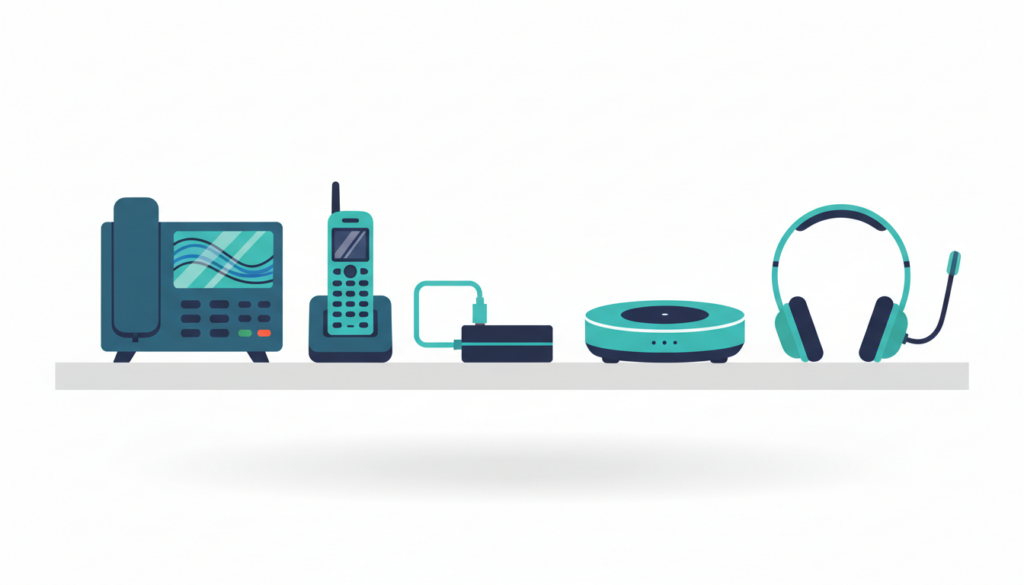
A VoIP phone is any device that makes calls over the internet using a VoIP service. That includes a physical desk phone with an Ethernet port, a cordless handset, a phone app on your computer or mobile, and even an old analog phone plugged into a small adapter box.
The phone itself doesn’t give you a phone number or calling service. Your VoIP provider does. The phone is just how you talk. If you’re new to the basics, read my guide on what VoIP is first.
Most business VoIP phones talk to the provider using SIP, the standard defined in IETF RFC 3261. That’s why you’ll see “SIP phone” used as another name for a VoIP desk phone. In theory a SIP phone can work with any SIP-based provider. In practice, you should always check your provider’s list of supported devices before you buy.
The 5 types of VoIP phones
Here’s the quick overview. I’ll go deeper on each one below.
| Type | What it is | Best for | Watch out for |
|---|---|---|---|
| Softphone app | Calling app on your computer, phone or browser | Remote teams, solo founders, anyone mobile | Needs a good headset and stable internet |
| IP desk phone | Hardware phone that plugs into your network | Reception, sales floors, people who live on the phone | Upfront cost, needs provider support |
| Cordless DECT phone | Wireless handset with a base station | Warehouses, shops, people walking around | Range limits, base needs power and network |
| Conference phone | Speakerphone for meeting rooms | Shared rooms and group calls | Only worth it if you have a real meeting room |
| Analog telephone adapter (ATA) | Box that connects an old analog phone or fax to VoIP | Keeping old phones, fax lines | Fax and alarm lines can be unreliable over VoIP |
Softphones: the “phone” most small businesses actually use
A softphone is just a calling app. Your provider’s desktop app, web app or mobile app is a softphone. Quo, Nextiva, Dialpad, RingCentral, Grasshopper and Talkroute all offer apps like this, according to their product pages.
This is what I use every day. My business number rings on my laptop and my phone at the same time. Calls, texts and voicemail transcripts all show up in one inbox. If I’m out at a coworking space or traveling, nothing changes.
Why softphones win for most small teams
- They cost nothing extra. The app comes with your plan.
- They go everywhere you go. No hardware to ship or configure.
- Texting, call history, notes and AI summaries live right next to the call.
- New hires are set up in minutes. Just send an invite.
Where softphones fall short
- Audio quality depends heavily on your headset and network. A laptop’s built-in mic in a noisy room sounds bad.
- Some people simply prefer a physical handset and real buttons.
- If your computer crashes or updates mid-call, so does your phone.
If you want the simplest softphone setup that works anywhere, Quo is what I’d start with. It’s what I use, the apps are clean, and the Starter plan is $15 per user per month billed annually with a 7-day free trial.
The one hardware purchase I’d make: a headset
If you go the softphone route, buy a proper headset. Honestly, this is the most important “VoIP phone” decision you’ll make. A wired USB headset or a good Bluetooth headset with a boom mic fixes most complaints about echo and background noise. Look for noise canceling on the microphone side, not just the earcups. Test it with a real call before you buy one for the whole team.
IP desk phones
An IP desk phone looks like a traditional office phone, but it plugs into your internet network with an Ethernet cable instead of a phone jack. It registers to your VoIP provider using SIP, and from then on it rings like any other phone on your account.
What to look for in an IP desk phone
- Provider support. This matters more than anything else. Check your provider’s supported devices list before you buy. Some providers sell phones preconfigured, which saves a lot of setup pain.
- PoE (Power over Ethernet). With PoE, the phone gets power and network through one cable, so you don’t need a power adapter at every desk. You’ll need a PoE switch or injector.
- Gigabit Ethernet pass-through. Lets you plug a computer into the phone so you don’t need two network cables per desk.
- Number of lines and programmable keys. Receptionists want lots of buttons for transfers and busy lamp fields. Sales reps usually need far fewer.
- Screen and headset port. A color screen is nice to have. A headset port (or Bluetooth) is a must for anyone on the phone all day.
- Wi-Fi option. Handy where you can’t run cable, but wired is still more reliable for voice.
Popular IP desk phone brands
Yealink, HP Poly and Grandstream are three of the biggest names in business desk phones. Yealink’s IP phone lineup covers everything from basic models to touchscreen executive phones, plus Teams and Zoom certified versions. HP Poly sells desk, wireless and conference phones and promotes compatibility with Microsoft Teams and Zoom on its product pages.
I’m not going to give you a “best desk phone” ranking here because I haven’t tested them hands-on, and model availability changes often. What I’d do is narrow it down to the 2 or 3 models your provider officially supports, then pick based on the number of keys and screen size you need.
How much do desk phones cost?
Prices vary a lot by model and retailer, so I’m not going to quote numbers I can’t verify. Basic models are fairly affordable, while touchscreen and video models cost much more. Some providers sell phones directly. UnitelVoice says on its pricing page that Office plan customers can buy desk phones through it at cost and have them shipped preconfigured and ready to use, which is a nice touch for non-technical teams. Nextiva’s pricing page notes that VoIP desk phones work with every plan, with the devices purchased separately.
Cordless DECT VoIP phones
DECT phones are cordless handsets that talk to a base station. The base station plugs into your network and connects to your VoIP provider. Handsets roam around within range of the base. Yealink’s lineup, for example, includes DECT base stations and handsets alongside its desk phones.
These are great for shops, warehouses, restaurants, showrooms and anyone who walks around while on the phone. Some systems support multiple base stations so you can cover a larger building.
What to check before you buy:
- How many handsets one base supports.
- Range in your actual building. Walls, metal shelving and floors cut range a lot.
- Whether your provider supports that base station model.
- Battery life on the handsets for a full shift.
Conference phones
A conference phone is a speakerphone built for a meeting room, with multiple microphones that pick up voices around a table. HP Poly’s Trio line and Yealink’s conference phones are common examples.
Be honest about whether you need one. If your team mostly joins meetings from laptops, a conference phone just collects dust. If you have a real meeting room where people dial into calls together, a good one is worth it because laptop mics in a big room sound terrible.
Analog telephone adapters (ATAs)
An ATA is a small box that turns an old analog phone into a VoIP phone. You plug the analog phone into the ATA’s phone port (called an FXS port), plug the ATA into your network, and configure it with your provider’s SIP details.
Grandstream’s HandyTone ATA range is a good example. Its product page lists models from single-port adapters up to 8-port units, and several support T.38, a standard for sending faxes over IP.
ATAs make sense when:
- You have analog phones you like and don’t want to replace.
- You still need a fax line, though fax over VoIP can be finicky.
- You’re moving an old office system over gradually.
Be careful with alarm systems, elevator phones and other “life safety” lines. These often expect a traditional phone line and may not work reliably over VoIP. Talk to your alarm company before you move those lines.
Mobile phones as VoIP phones
Don’t forget the phone in your pocket. Every major business VoIP provider has a mobile app that turns your smartphone into a business phone with your business number as caller ID. For a solo founder, this plus a laptop app is often all you need.
Some services, like Grasshopper, are built around this idea. Your business number simply rings your existing cell, and you don’t need to change how you make calls.
Do you actually need a VoIP desk phone?
Here’s my honest decision guide.
You probably don’t need desk phones if:
- You’re a solo founder or a small remote team.
- People work from home, cafes or coworking spaces.
- You want calls and texts in the same app.
- You’d rather spend that money on ads or inventory.
You probably do want desk phones if:
- You have a reception desk or a front counter that answers lots of calls.
- Staff share a phone at a station, like a warehouse or showroom.
- Someone spends 6 or more hours a day on the phone and prefers a handset.
- Older staff are more comfortable with a physical phone.
I’ve been teaching high-ticket dropshipping at Ecommerce Paradise since 2015, and if you’re starting a store, my advice is to skip desk phones at the start. Get the business number running on a softphone and mobile app, put it on every page of the store, and only add hardware once the call volume tells you to.
Network and power basics for VoIP phones
VoIP phones are only as good as the network behind them. Here’s what to check.
Bandwidth and quality
Voice calls don’t need huge bandwidth. The classic G.711 codec uses 64 kbps of audio per direction before overhead. The real enemies are jitter, latency and packet loss. A cheap router or overloaded Wi-Fi causes more trouble than a slow plan. Wire your desk phones with Ethernet whenever you can.
Power outages
Unlike old copper landlines, VoIP desk phones need power. PoE phones need the network switch to have power. If the power goes out, so do the phones, unless you have a battery backup (UPS) on your modem, router and PoE switch. Mobile apps on cellular data are a solid backup.
Security
Change default admin passwords on every phone and ATA, keep firmware updated, and don’t expose phone web interfaces to the internet. NIST’s guide to VoIP security considerations is older, but its advice on protecting phones and network gear is still relevant.
911 and emergency calling with VoIP phones
This matters, so read it carefully.
Federal rules known as Kari’s Law require multi-line phone systems to let people dial 911 directly, without first dialing a prefix like 9. Interconnected VoIP providers also need a registered address so emergency calls go to the right place, and the FCC explains in its VoIP and 911 guide that VoIP 911 may not work during power or internet outages.
If you move a desk phone to a new office, or a remote worker takes one home, the registered address has to be updated. Otherwise responders might go to the wrong place.
Also know that some app-based services don’t offer 911 at all. Quo’s porting documentation says emergency services (911) aren’t available through Quo, which is why I keep a regular mobile phone for emergencies. Before you buy hardware for an office, confirm 911 support and the registered address for every phone and every location with your provider.
Which provider works best with VoIP phones?
Here’s how I’d think about it, based on provider pages and my own use of Quo.
If you want to skip hardware and run everything from apps, Quo is the setup I use and recommend for solo founders and small online teams.
If you want desk phones shipped to you ready to plug in, UnitelVoice’s Office plan advertises preconfigured phones at cost plus a dedicated account manager for setup. The Office plan is listed at $29.99 a month billed monthly with 3 users included.
If you want a larger platform where desk phones work on every plan, Nextiva says its plans support VoIP desk phones, with devices sold separately.
RingCentral also supports desk phones, and its free trial includes up to 2 desk phones, which must be returned within 21 days if you cancel, according to the RingCentral pricing page.
For more help choosing the service itself, see my VoIP phone service guide. Planning a full switch? Start with the business VoIP for beginners guide.
My recommended setups for 2026
Here’s what I’d buy for a few common situations.
Solo founder or online store owner
- Softphone apps on laptop and mobile.
- One good headset with a noise-canceling boom mic.
- No desk phone.
That’s basically how I run things in Bali.
Small office with a front desk
- One IP desk phone at reception with a headset port and enough keys for transfers.
- Softphones for everyone else.
- A UPS battery on the router and switch.
Shop or warehouse
- A DECT base station with cordless handsets for staff on the floor.
- One desk phone at the counter or office.
- Mobile apps for managers.
Office with a meeting room
- Desk phones or softphones per person.
- One conference phone or a speakerphone in the meeting room.
FAQ
What is the difference between a VoIP phone and a regular phone?
A VoIP phone sends calls over the internet using a VoIP service. A regular landline phone uses a copper phone line. Many VoIP phones look the same as office phones, but they plug into your network instead of a phone jack.
Can I use my existing phone with VoIP?
Often yes. You can plug an analog phone into an analog telephone adapter (ATA), or use your smartphone with your provider’s mobile app. Existing IP desk phones may work if your provider supports that model.
Do VoIP phones work without internet?
No. VoIP phones need an internet connection and power. Set up call forwarding or a mobile app on cellular data as a backup for outages.
Are all VoIP phones compatible with all providers?
No. Most desk phones use the SIP standard, but providers only support certain models. Some app-first services focus on softphones. Always check your provider’s supported device list before buying hardware.
What is a softphone?
A softphone is a calling app on your computer, browser or mobile phone. It works like a desk phone but uses your device’s speaker and microphone, or a headset.
Do I need a special router for VoIP phones?
Usually not, but a quality router helps. Wired Ethernet, PoE switches for desk phones and a UPS battery backup make VoIP phones more reliable.
Related guides
- What is VoIP?
- VoIP phone service buyer’s guide
- Cloud phone systems explained
- Hosted PBX explained
- Business VoIP for beginners

Trevor Fenner publishes VoIP Paradise, covering business phone software, remote-team communications and practical calling workflows. Articles distinguish documented research from direct testing.