
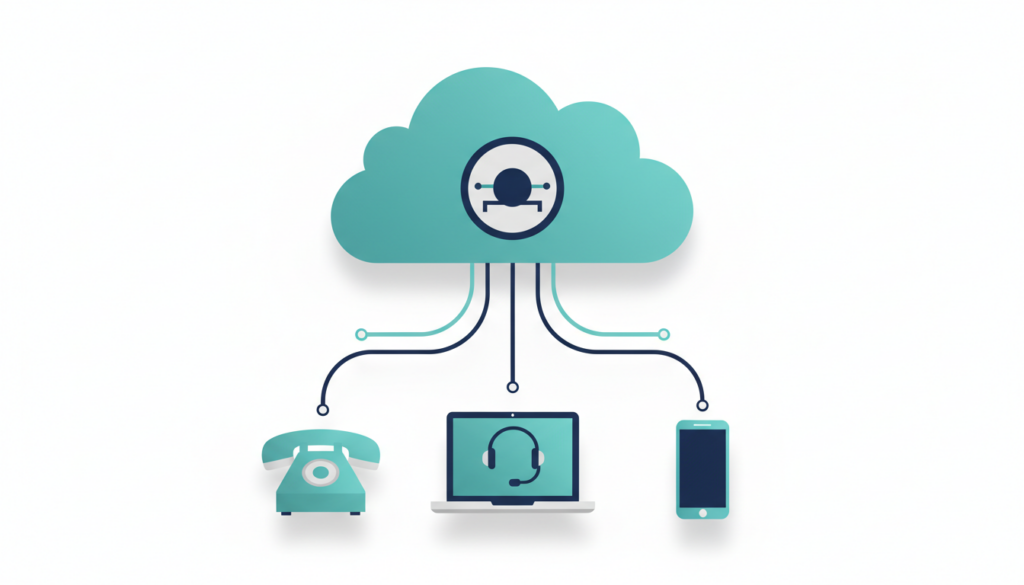
A PBX is the brain of a business phone system. It’s the thing that rings the right person, sends callers to voicemail, plays the “press 1 for sales” menu and lets you transfer a call to a coworker. A hosted PBX is that same brain running in a provider’s data center instead of in a closet in your office.
That’s really it. But the details matter a lot when you’re picking one, so let’s break it all down. In this guide I’ll cover what a PBX phone system is, how hosted PBX works, what it costs in 2026, the features that actually matter, the gotchas on 911 and contracts, and which providers I’d look at first.
Some background on me. I’ve been selling online since 2005 and I started my high-ticket dropshipping business in October 2010. The phone was a huge part of that. Buyers dropping thousands of dollars on one order wanted to talk to someone before they checked out, so our number lived on every page of the site. I later started Ecommerce Paradise to teach that model. Today I live in Bali and run a US business number over the internet, so hosted phone systems are something I use every single day.
A quick note on sources. I use Quo personally. Everything about other providers in this guide is research-based, pulled from official pricing pages and docs as of November 2026, per our editorial standards. I haven’t hands-on tested RingCentral, Nextiva, Dialpad, Grasshopper or Talkroute for this site.
What is a PBX phone system?
PBX stands for private branch exchange. It’s a private phone network inside a business. It lets a company share a set of outside lines across many employees, give everyone an extension, and route calls internally without paying the phone company for every transfer.
Before the internet, a PBX was a physical box of circuit boards bolted to a wall. Copper lines from the phone company plugged into one side. Desk phones plugged into the other. A technician programmed it, and changing anything meant calling that technician back.
Here’s what any PBX does, old or new:
- Gives each person or desk an extension number.
- Routes incoming calls to the right person, team or queue.
- Runs an auto attendant, the “press 1 for sales, press 2 for support” menu.
- Handles transfers, holds, conference calls and call parking.
- Sends unanswered calls to voicemail.
- Applies business hours rules, so after-hours calls go somewhere sensible.
The 3 types of PBX
| Type | Where it lives | What you pay | Who maintains it |
|---|---|---|---|
| Traditional PBX | A box in your office on copper lines | Big upfront hardware cost plus phone lines | A phone technician |
| IP PBX (on-premise) | A server in your office using internet lines | Hardware or server plus SIP trunks | You or your IT team |
| Hosted PBX (cloud PBX) | The provider’s data centers | Monthly fee per user | The provider |
What is a hosted PBX?
A hosted PBX is a PBX that the provider runs for you in the cloud. You don’t buy a box. You don’t buy phone lines. You sign up, pick your numbers, add your users, and everyone makes and takes calls through a desk phone, a computer app or a mobile app.
You’ll also hear it called a cloud PBX, a virtual PBX, a cloud phone system or UCaaS when it bundles video meetings and chat. Marketing teams love new names. Under the hood, it’s all the same idea.
How a hosted PBX works
- Your provider owns the PBX software and runs it across its data centers.
- Your phone numbers live with that provider.
- Each user logs into an app or a desk phone that connects to the provider over the internet using SIP.
- When someone calls your number, the hosted PBX applies your rules and rings the right devices.
- You change everything from a web dashboard. New hire? Add a user. Need a new menu? Edit it in a few minutes.
If you want the basics of the underlying tech first, check my guide on what VoIP is. Hosted PBX is just VoIP with the business features layered on top.
Hosted PBX vs on-premise PBX
This is the big decision. Here’s the honest comparison.
| Factor | Hosted PBX | On-premise IP PBX |
|---|---|---|
| Upfront cost | Little to none beyond phones | Server or appliance, licenses, install |
| Monthly cost | Per user subscription | SIP trunks plus maintenance |
| Setup time | Hours to days | Days to weeks |
| Maintenance | Provider handles updates and security | You patch and secure it |
| Remote work | Built in with mobile and desktop apps | Possible but takes setup |
| Control | Limited to what the provider offers | Full control over everything |
| Best for | Most small and midsize businesses | Large sites with IT staff or special needs |
For 9 out of 10 small businesses, hosted wins. No hardware to break, no technician to call, and your team can answer the business line from anywhere. That last part matters to me. I answer business calls from Bali on the same US number my customers have always called.
On-premise still has a place. If you run a big call center with custom integrations, you have strict data rules that keep systems in-house, or you’ve already sunk money into a PBX that works well, keeping it on-premise with SIP trunks can make sense. My SIP trunking guide covers that path.
Hosted PBX features that actually matter
Every provider brags about 100+ features. Most of them you’ll never touch. Here’s what actually moves the needle for a small business.
Auto attendant and call routing
The menu that greets callers and sends them to the right place. Keep it short. Two or three options max. Nothing kills a sale faster than a 6-option phone tree.
Ring groups and call queues
A ring group rings several people at once or in order. A queue holds callers in line until someone’s free. For a sales line, I’d always ring a group first so the call gets picked up fast.
Mobile and desktop apps
This is the killer feature. Your business number on your cell phone, without giving out your personal number. Every serious hosted provider has this now.
Business hours and after-hours rules
Route calls differently at night and on weekends. Send them to voicemail, a cell phone, an answering service or an AI agent.
Voicemail to email and transcription
Read your voicemails instead of listening to them. Huge time saver.
Call recording
Great for training and quality. But be careful. Some US states require every party on the call to consent before you record. Check the laws where you and your callers are, and use a recording notice to be safe. Your provider’s docs and a lawyer are the right sources here, not a blog post.
Business texting
Most hosted PBX platforms let you text from your business number. In the US you’ll need to register for 10DLC through The Campaign Registry before carriers will reliably deliver your messages. Quo’s pricing page, for example, lists the registry fee at $1.50 to $3 per month depending on use case. Plan for it.
AI answering
This is new and moving fast. Some platforms now include an AI agent that picks up when you can’t, answers common questions and takes messages. I use Quo’s agent, Sona, on my own line. When I’m busy or asleep in Bali, it handles the call and I get a summary. If someone needs me directly, I tell them to WhatsApp me. My guide to the AI receptionist covers this in depth.
Integrations
CRM integrations log calls automatically. If your team lives in HubSpot or Salesforce, check that the provider integrates on the plan you’re buying, not just the top tier.
How much does a hosted PBX cost in 2026?
Most providers charge per user per month. Annual billing is almost always cheaper than month to month. Here’s what official pricing pages listed when I checked on November 3, 2026, before taxes and regulatory fees.
| Provider | Entry plan price | Billing notes |
|---|---|---|
| Quo | $15 per user per month | Billed annually. $19 month to month. 7-day free trial |
| Nextiva | $15 per user per month | NEXT Core on a 12-month term. $23 month to month |
| Dialpad | $15 per user per month | Standard plan. 14-day free trial |
| RingCentral | $20 per user per month | Core, paid annually. $30 paid monthly |
| Talkroute | $19 per month | Basic with 1 user. $5 per additional user |
| Grasshopper | From $14 per month | Starting price on its pricing page. 7-day free trial |
Don’t just compare the headline number. Here’s what to check before you buy:
- Is the price annual only? A lot of headline prices require a 12-month contract.
- How many users are included? Talkroute’s plans, for example, bundle users, which changes the math a lot for small teams.
- What’s the user minimum? Some plans need 2 or 3 users.
- What does texting cost, and is 10DLC registration extra?
- Are toll-free minutes included or metered?
- What are the taxes and fees? Regulatory fees can add a noticeable chunk to your bill.
- What does it cost to leave? Look for early termination fees and number porting rules.
Hosted PBX vs on-premise: rough cost example
Say you’re a 10-person office. Here’s a rough comparison using list prices. Your numbers will differ.
| Cost item | Hosted PBX | On-premise IP PBX |
|---|---|---|
| Software or hardware | $0 | A few thousand dollars for an appliance and licenses |
| Phone service | 10 users at $15 to $25 per month, so $1,800 to $3,000 a year | SIP trunk channels, often $20 to $25 per channel per month |
| Maintenance | Included | IT time or a support contract |
| Desk phones | Optional, apps are free | Usually required |
The hosted model wins on predictability. You know exactly what you’ll pay every month, and you’re not on the hook when a server dies at 2am.
The downsides of hosted PBX
I’m not going to pretend it’s perfect. Here’s what can go wrong.
Your internet is your phone line
If your internet goes down, your desk phones go down. The fix is simple though. Set up failover rules so calls ring your cell phone app if the office goes offline. Most hosted systems do this automatically.
Call quality depends on your connection
Voice needs low latency and low jitter, not huge bandwidth. The ITU’s G.114 recommendation on one-way delay is the standard engineers use for how much delay a call can handle. In practice, a decent business connection and a router with QoS solves most quality complaints.
Less control
You get the features the provider builds. If you need something truly custom, you may hit a wall. That’s when an on-premise PBX or an API platform starts to look better.
Contracts and price increases
The cheapest advertised prices usually need an annual term. Read the renewal terms. Some providers raise prices at renewal.
911 on a hosted PBX: don’t skip this
A hosted PBX is a multi-line telephone system under federal law, and the 911 rules apply. Under Kari’s Law, systems installed after February 16, 2020 must allow direct 911 dialing without a prefix like 9, and must notify a central point such as a front desk when someone calls 911. RAY BAUM’S Act added rules on sending a dispatchable location, meaning a street address plus details like floor or suite. The FCC’s 911 order in the Federal Register explains how this applies to cloud-based systems. The current rule text lives in 47 CFR Part 9.
What to do:
- Add a correct emergency address for every user and every desk phone in your dashboard.
- For remote workers, make sure the provider supports updating the emergency address when they move.
- Set up 911 notifications to a manager or front desk.
- Understand that 911 over VoIP may not work during a power or internet outage. Keep a cell phone handy.
- Confirm exact E911 behavior with your provider for each location.
How to pick a hosted PBX provider
Here’s my simple process. Go deep before you go wide. Pick 2 or 3 providers, not 10.
- List your must-haves. Number of users, texting, call recording, CRM, AI answering, international calling.
- Check where your team works. Office, home, abroad. Remote-heavy teams need great mobile apps.
- Run a free trial with your real team. Make test calls on your actual internet.
- Call support during the trial. See how fast they answer. That tells you a lot.
- Port one number first if you can. Keep the old service active until the port completes.
- Read the contract before you commit to an annual plan.
If you’re brand new to all of this, start with my business VoIP for beginners guide. It walks you through planning your call flow before you switch.
The hosted PBX providers I’d look at first
Here’s my shortlist by situation. Remember, I personally use Quo. The rest is research-based.
Solo founders and small teams: Quo
Quo (formerly OpenPhone) is what I run my business on, because it’s simple, the apps are excellent and unlimited calling to US and Canadian numbers works from any country with internet. I run my US line from Bali and nobody can tell. Plans list from $15 per user per month billed annually, and the Sona AI agent picks up when I can’t.
Growing teams that want room to scale: Nextiva
Nextiva makes sense if you expect to grow into a contact center, because it bundles phones, messaging and customer service tools on one platform. NEXT Core lists at $15 per user per month on a 12-month term.
AI-first teams: Dialpad
Dialpad is worth a look if you want AI transcripts and call summaries on every call. Its Standard plan lists from $15 per user per month with a 14-day free trial.
Bigger organizations: RingCentral
RingCentral’s RingEX plans start at $20 per user per month paid annually for Core. It’s a big, mature platform with a lot of features and multi-site support. It’s usually more than a tiny team needs.
Budget-friendly small offices: Talkroute and Grasshopper
Talkroute is a good fit for tiny teams on a budget, because its Basic plan lists at $19 per month with 1 user and $5 per additional user. Grasshopper is a simple virtual phone system for solo owners who mainly need a business number on their cell, starting at $14 per month on its pricing page.
For a full ranked list, see my roundup of the best VoIP for small business.
FAQ
What is a PBX phone system in simple terms?
A PBX phone system is a private phone network for a business. It gives each person an extension, routes calls to the right people, runs the phone menu and handles transfers and voicemail. A hosted PBX does all of that from the cloud.
Is hosted PBX the same as VoIP?
Hosted PBX uses VoIP, but they aren’t exactly the same thing. VoIP is the technology that carries calls over the internet. A hosted PBX is a full business phone system, with extensions, menus and routing, built on top of VoIP.
How much does a hosted PBX cost per user?
As of November 2026, entry plans from major providers list at roughly $15 to $20 per user per month on annual billing, and a bit more month to month. Taxes, regulatory fees and add-ons like texting registration come on top.
Do I need special phones for a hosted PBX?
No. You can use free desktop and mobile apps. If you want desk phones, you’ll need IP phones that your provider supports. My VoIP phones guide covers your options.
Can I keep my existing business phone number?
Yes. Almost every hosted PBX provider can port your existing local or toll-free numbers. Keep your old service active until the port is complete so you don’t lose the number.
What happens to my hosted PBX if the internet goes down?
Your desk phones stop working, but the PBX itself keeps running in the cloud. Set up failover so calls ring your mobile app or a cell phone automatically. That’s one of the big advantages over an on-premise box.
Related guides
- What is SIP trunking?
- Cloud phone systems explained
- VoIP vs landline for business
- Best VoIP for small business
- Business VoIP for beginners

Trevor Fenner publishes VoIP Paradise, covering business phone software, remote-team communications and practical calling workflows. Articles distinguish documented research from direct testing.